



WNT GSRW | 交互式弹道残留物与指纹读取器 | ESX / QBCore / Qbox
WNT GSRW 是一款专为警察和执法角色扮演设计的交互式弹道残留物(GSR)和指纹读取器。
与通过简单命令或即时通知处理 GSR 检查不同,GSRW 将该过程转变为警官与被测试者之间的互动。
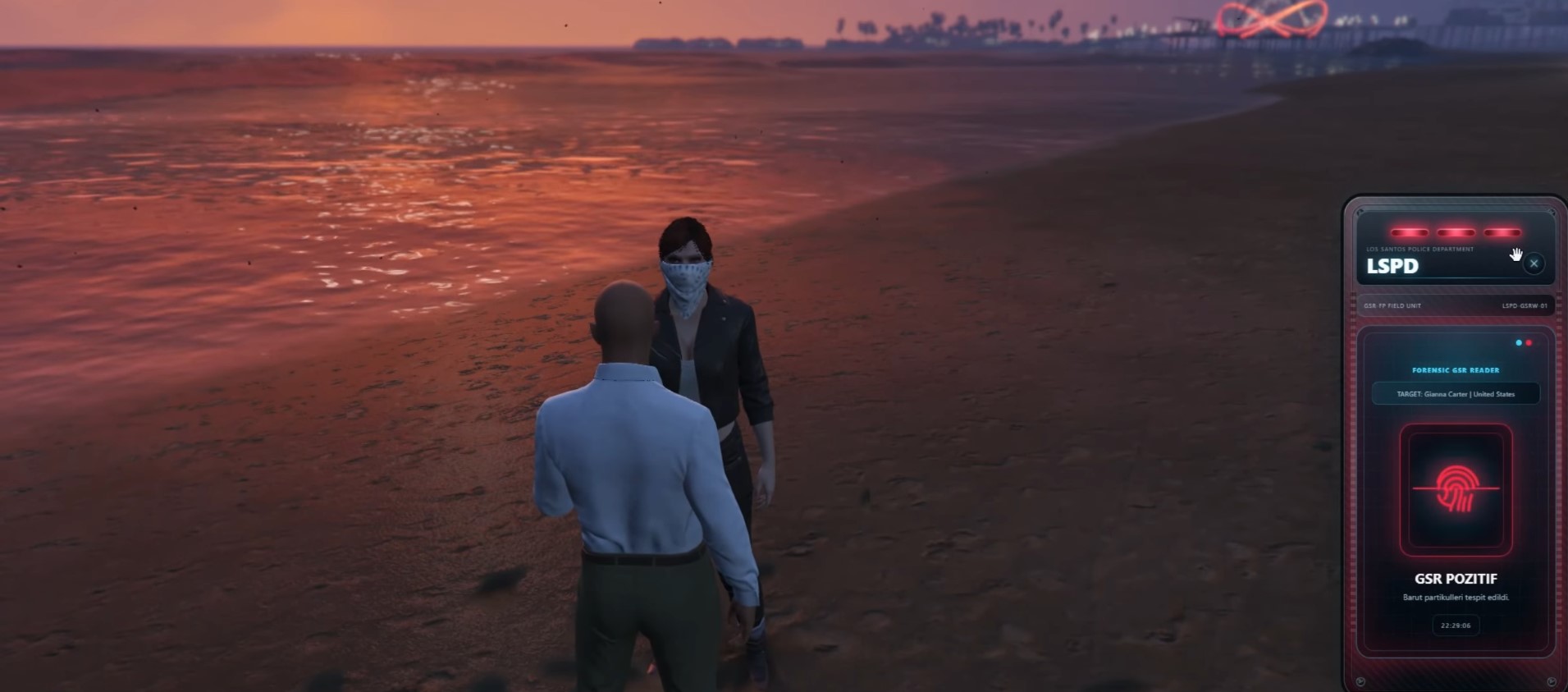
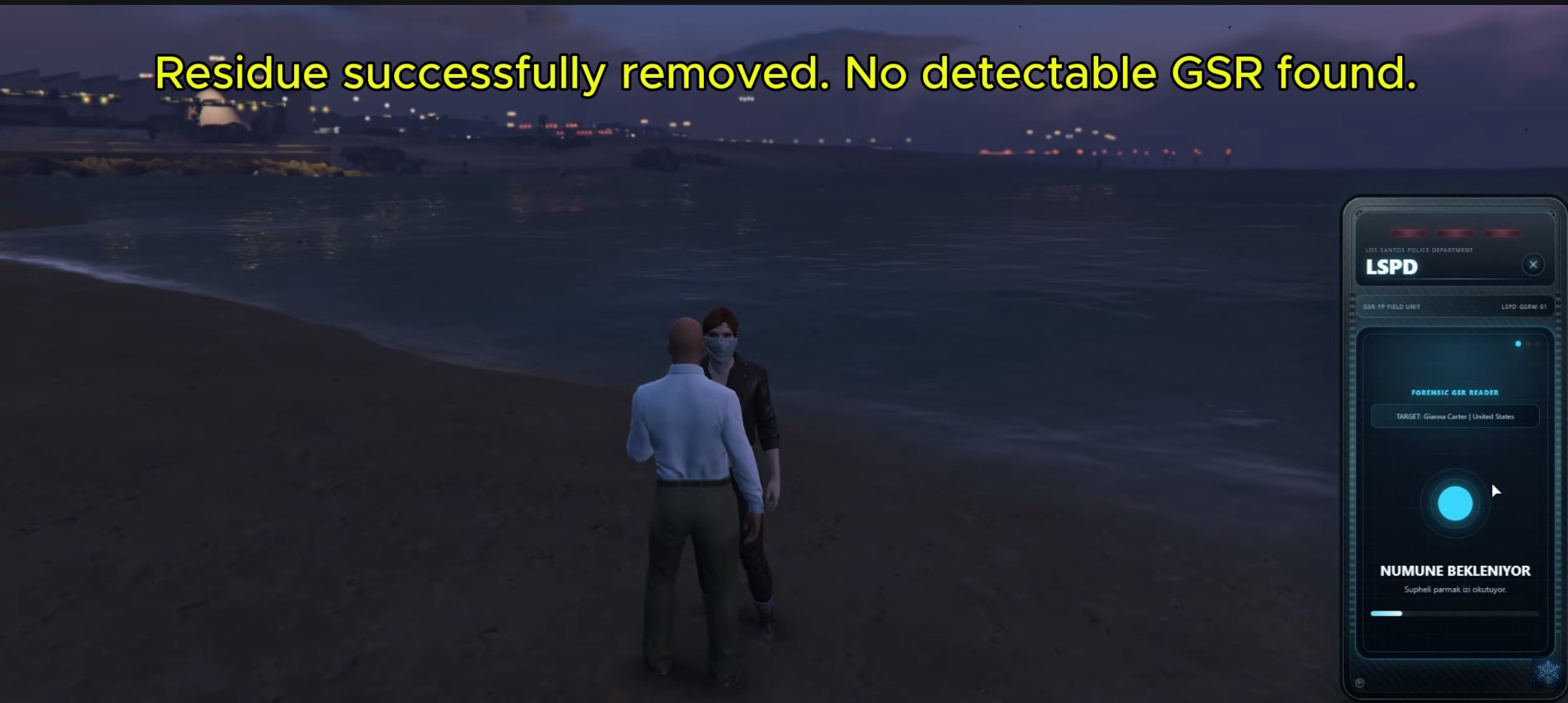
警官使用便携式读取器对附近的玩家进行操作。目标会看到指纹扫描界面,必须在扫描板上按住手指,同时设备处理样本。扫描完成后,警官通过读取器界面收到最终的 GSR 阳性 或 GSR 阴性 结果。
该系统跟踪武器使用后的弹道残留物,并可以保持玩家阳性状态,直到残留物被正确清除,使 GSR 检查成为调查、交通检查、逮捕和其他警察 RP 情境的一部分。
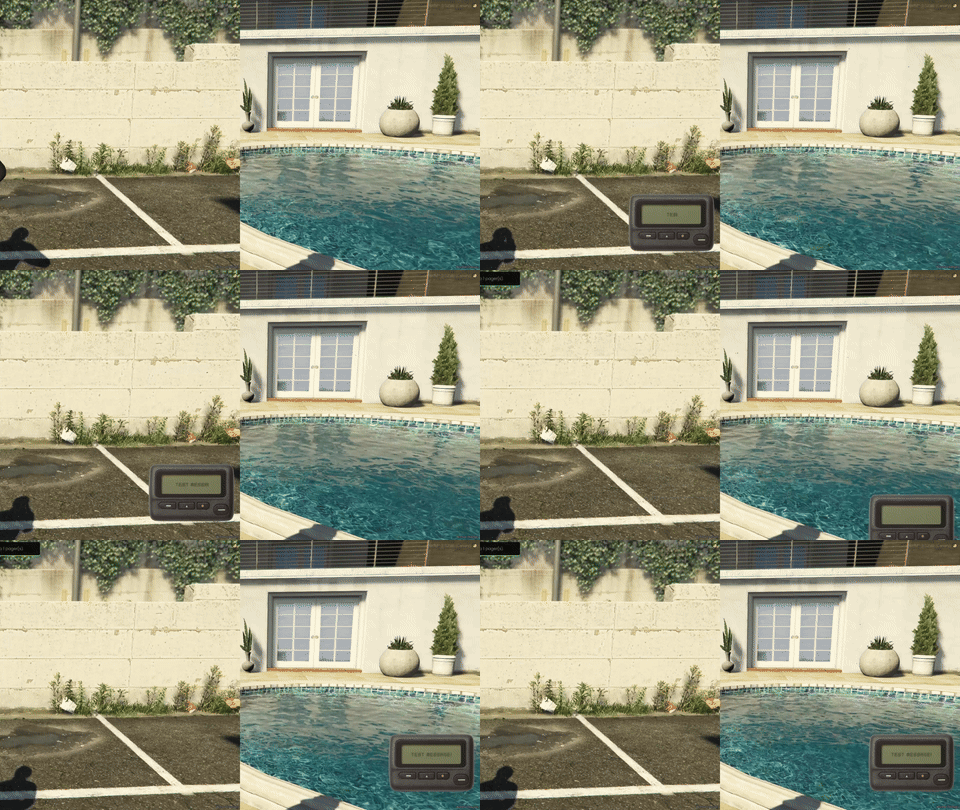
预览:
视频预览:
Youtube
购买:
TEBEX
工作原理
当玩家开枪时,GSRW 可以将该角色标记为 GSR 阳性。
之后,授权警官可以在靠近玩家时使用 GSR 读取器。
该过程是交互式的:
1. 警官开始 GSR 测试
读取器在配置的距离内搜索附近的玩家。
2. 疑犯接收指纹扫描器
被测试玩家会看到指纹界面,并被指示在扫描板上按住左键。
3. 指纹样本被处理
玩家必须继续按住扫描器,直到配置的扫描持续时间结束。如果未完成,测试可以取消或过期。
4. 警官收到结果
指纹扫描完成后,警官的读取器会显示以下内容:
GSR POSITIVE
检测到弹道残留物颗粒。
或
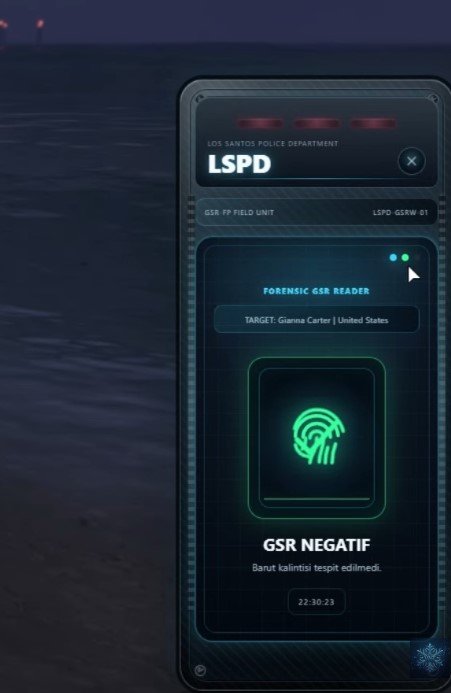
GSR NEGATIVE
未检测到弹道残留物。
读取器还可以显示从所选框架获取的角色身份信息,包括角色的名字、姓氏和可用的国籍/国家信息。
弹道残留物系统
GSRW 包括其自身的弹道残留物跟踪功能。
当玩家开枪时,系统可以将其注册为 GSR 阳性。
您可以配置 GSR 是否在清洁前保持阳性,或使用基于时间的设置。
在默认配置下:
Config.GSR.PositiveOnceUntilClean = true
Config.GSR.PositiveDuration = 0
残留物会保持到玩家成功清除为止。
某些武器也可以被排除在 GSR 检测之外。
默认忽略的武器包括:
WEAPON_UNARMED
WEAPON_STUNGUN
WEAPON_FIREEXTINGUISHER
WEAPON_PETROLCAN
执法职业在执勤时可以额外被排除在正常 GSR 应用之外。
这有助于防止警官在正常警察活动中不断变为 GSR 阳性。
水清洁
玩家可以通过内置的水清洁系统清除弹道残留物。
当启用时,进入水会开始配置的清洁过程。
默认情况下,玩家必须在水里停留,直到清洁过程完成。在完成前离开水会防止 GSR 被清除。
示例配置:
Config.WaterCleaning.Enabled = true
Config.WaterCleaning.Duration = 10000
Config.WaterCleaning.RequireStayInWater = true
清洁持续时间、进度文本、取消行为和控制都可以配置。
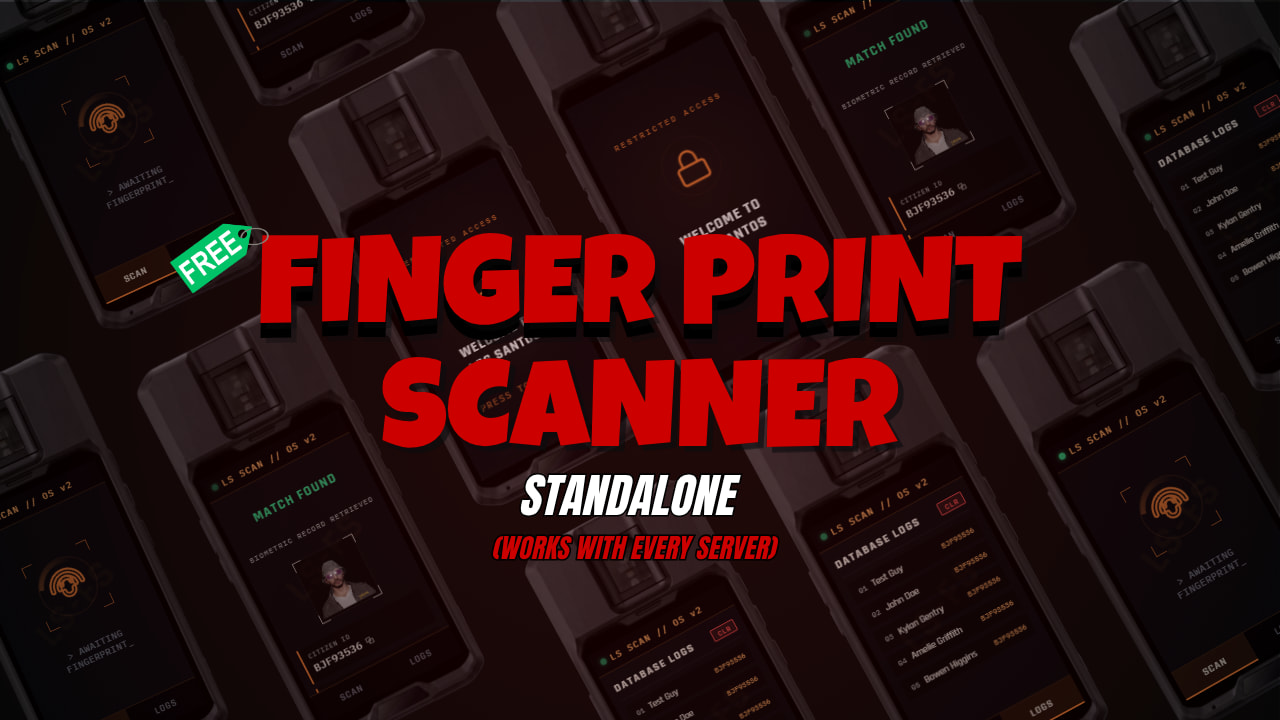
指纹读取器 UI
GSRW 包括一个围绕便携式法医读取器设计的自定义 NUI。
界面为双方有单独的状态。
警官
在疑犯提供样本时,警官会看到样本正在等待。
扫描完成后,读取器会显示最终的阳性或阴性结果。
疑犯
疑犯会收到指纹扫描屏幕,必须在扫描板上按住左键,直到样本完成。
界面包括可配置的:
-
部门标题
-
机构名称
-
设备名称
-
设备序列号
-
强调色
-
阳性结果颜色
-
阴性结果颜色
-
面板颜色
-
报警
-
报警音量
-
UI 标签和文本
这允许读取器适应您服务器的视觉身份或警察部门。
角色信息
读取器直接从配置的框架获取身份信息。
QBCore / Qbox
GSRW 使用可用的角色信息,例如:
charinfo.firstname
charinfo.lastname
charinfo.nationality
ESX
该资源使用可用的 ESX 身份名称信息,并在可用时可以使用 国籍 或 国家 元数据。
框架支持
GSRW 支持:
-
QBCore
-
Qbox
-
ESX
框架直接从 config.lua 选择。
Example:
Config.Framework = {
    Name = 'qbcore',
    CoreObject = 'qb-core',
    QboxObject = 'qbx_core',
    ESXObject = 'es_extended',
    UseFrameworkNotify = true
}
您不需要为每个支持的框架分别提供资源版本。
物品与命令使用
读取器可以作为库存物品使用。
默认物品:
Config.Item = {
    Enabled = true,
    Name = 'gsrw'
}
还包含基于命令的选项,可以从配置中启用。
Config.Command.Enabled = false
Config.Command.Name = 'gsrw'
Config.Command.AdminOnly = true
这允许服务器管理员使用物理库存物品进行正常游戏,同时可以选择为管理员保留命令访问权限。
职业限制
对读取器的访问可以按职业限制。
默认配置:
Config.Access.EnableJobCheck = true

Config.Access.AllowedJobs = {
    police = true,
    sheriff = true
}
可以添加其他职业或禁用限制,具体取决于您的服务器设置。
可配置扫描系统
服务器管理员可以配置互动本身,包括:
Config.Scan.MaxDistance = 2.0
Config.Scan.HoldDuration = 4500
Config.Scan.RequestTimeout = 30000
Config.Scan.AllowSelfScan = false
Config.Scan.ServerDistanceCheck = false
这提供了对:
-
最大测试距离
-
指纹按住持续时间
-
请求超时时间
-
自我扫描
-
服务器端距离验证
-
NUI 聚焦行为
设备动画与道具
GSRW 包括可配置的警官动画支持。
该资源还可以在启用时使用手持道具。
Example:
Config.DeviceProp.Enabled = true
Config.DeviceProp.AnimationEnabled = true
Config.DeviceProp.PropEnabled = false
动画字典、动画名称、骨骼、模型、偏移和旋转都是可配置的。
语言
GSRW 目前包括:
英语
西班牙语
土耳其语
法语
可以使用:
Config.Locale = 'en'
本地化系统涵盖读取器界面、通知、命令帮助和清洁文本。
主要功能
-
交互式手持 GSR 读取器
-
玩家间指纹扫描
-
按住扫描指纹互动
-
GSR 阳性/阴性结果
-
自动弹道残留物检测
-
持久 GSR 直到清洁
-
可选基于时间的 GSR
-
水基 GSR 清洁
-
角色身份信息
-
职业限制访问
-
执勤执法豁免
-
物品使用
-
可选管理员命令
-
可配置扫描距离和持续时间
-
可配置设备动画
-
可选手持道具
-
可定制读取器 NUI
-
可配置报警和 UI 主题
-
英语、西班牙语、土耳其语和法语本地化
-
ESX 支持
-
QBCore 支持
-
Qbox 支持
-
客户端导出用于自定义集成
导出
读取器也可以从另一个资源打开:
exports['wnt-gsrw']:UseReader()
这可以用于将 GSRW 与另一个库存、警察系统或自定义互动集成。
安装
-
将
wnt-gsrw放入您的服务器资源中。 -
确保你的框架和物品栏在 GSRW 之前启动。
-
添加:
ensure wnt-gsrw
到你的 server.cfg 中。
-
在
config.lua中选择你的框架。 -
将
gsrw物品添加到你的物品栏中。 -
如果需要,将附带的
gsr.png物品图片复制到你物品栏的图片目录中。
资源文档中包含了 QBCore/QB Inventory, Qbox/Ox Inventory and ESX 的物品示例。
配置
开放的配置选项允许服务器所有者修改资源的主要行为,包括:
-
框架
-
语言
-
物品名称
-
命令权限
-
管理员组
-
允许的职业
-
扫描距离
-
扫描持续时间
-
请求超时时间
-
自我扫描
-
GSR 行为
-
忽略的武器
-
值班职业豁免
-
水中清除
-
设备动画
-
设备道具
-
部门信息
-
读取器标签
-
UI 颜色
-
警报行为
-
通知
-
语言文本
所需信息
| 代码可访问 | 部分 – 配置已开放 |
| 基于订阅 | 否 |
| 代码行数(约) | |
| 依赖要求 | ESX、QBCore 或 Qbox |
| 支持 | 是 |
WNT Development
查看英文原文 (Original)
WNT GSRW | Interactive GSR & Fingerprint Reader | ESX / QBCore / Qbox
WNT GSRW is an interactive Gunshot Residue (GSR) and fingerprint reader designed for police and law-enforcement roleplay.
Instead of handling GSR checks through a simple command or instant notification, GSRW turns the process into an interaction between the officer and the person being tested.
An officer uses the handheld reader on a nearby player. The target is presented with the fingerprint scanner interface and must hold their finger on the scanning plate while the device processes the sample. Once the scan is completed, the officer receives the final GSR Positive or GSR Negative result through the reader interface.
The system tracks gunshot residue after weapon use and can keep a player positive until the residue is properly removed, allowing GSR checks to become part of investigations, traffic stops, arrests and other police RP situations.
Preview:
Video Preview:
Youtube
Purchase:
TEBEX
How It Works
When a player fires a weapon, GSRW can mark that character as GSR positive.
Later, an authorized officer can use the GSR reader while standing near the player.
The process is interactive:
1. The officer starts the GSR test
The reader searches for a nearby player within the configured distance.
2. The suspect receives the fingerprint scanner
The tested player sees the fingerprint interface and is instructed to hold left click on the scanning plate.
3. The fingerprint sample is processed
The player must continue holding the scanner for the configured scan duration. The test can be cancelled or expire if it is not completed.
4. The officer receives the result
After the fingerprint scan is completed, the officer’s reader displays either:
GSR POSITIVE
Gunshot residue particles were detected.
or
GSR NEGATIVE
No gunshot residue was detected.
The reader can also display character identity information obtained from the selected framework, including the character’s first name, last name and available nationality/country information.
Gunshot Residue System
GSRW includes its own gunshot residue tracking.
When a player fires a weapon, the system can register them as GSR positive.
You can configure whether GSR remains positive until cleaned or use a duration-based setup.
With the default configuration:
Config.GSR.PositiveOnceUntilClean = true
Config.GSR.PositiveDuration = 0
the residue remains until the player successfully cleans it.
Certain weapons can also be excluded from GSR detection.
The default ignored weapons include:
WEAPON_UNARMED
WEAPON_STUNGUN
WEAPON_FIREEXTINGUISHER
WEAPON_PETROLCAN
Law-enforcement jobs can additionally be excluded from normal GSR application while on duty.
This is useful for preventing officers from constantly becoming GSR positive during normal police activity.
Water Cleaning
Players can remove gunshot residue through the built-in water cleaning system.
When enabled, entering water starts the configured cleaning process.
By default, the player must remain in the water until the cleaning process has finished. Leaving the water before completion prevents the GSR from being removed.
Example configuration:
Config.WaterCleaning.Enabled = true
Config.WaterCleaning.Duration = 10000
Config.WaterCleaning.RequireStayInWater = true
The cleaning duration, progress text, cancellation behavior and controls can all be configured.
Fingerprint Reader UI
GSRW includes a custom NUI designed around a portable forensic reader.
The interface has separate states for both participants.
Officer
While the suspect is providing the sample, the officer sees that the sample is pending.
After the scan finishes, the reader displays the final positive or negative result.
Suspect
The suspect receives the fingerprint scanning screen and must hold left click over the scan plate until the sample is completed.
The interface includes configurable:
-
Department header
-
Agency name
-
Device name
-
Device serial
-
Accent color
-
Positive result color
-
Negative result color
-
Panel colors
-
Alarm
-
Alarm volume
-
UI labels and text
This allows the reader to be adapted to the visual identity of your server or police department.
Character Information
The reader obtains identity information directly from the configured framework.
QBCore / Qbox
GSRW uses available character information such as:
charinfo.firstname
charinfo.lastname
charinfo.nationality
ESX
The resource uses the available ESX identity name information and can use nationality or country metadata when available.
Framework Support
GSRW supports:
-
QBCore
-
Qbox
-
ESX
The framework is selected directly from config.lua.
Example:
Config.Framework = {
    Name = 'qbcore',
    CoreObject = 'qb-core',
    QboxObject = 'qbx_core',
    ESXObject = 'es_extended',
    UseFrameworkNotify = true
}
You do not need separate versions of the resource for each supported framework.
Item & Command Usage
The reader can be used as an inventory item.
Default item:
Config.Item = {
    Enabled = true,
    Name = 'gsrw'
}
A command-based option is also included and can be enabled from the configuration.
Config.Command.Enabled = false
Config.Command.Name = 'gsrw'
Config.Command.AdminOnly = true
This allows server owners to use the physical inventory item for normal gameplay while optionally keeping command access available for administrators.
Job Restrictions
Access to the reader can be restricted by job.
Default configuration:
Config.Access.EnableJobCheck = true

Config.Access.AllowedJobs = {
    police = true,
    sheriff = true
}
Additional jobs can be added or the restriction can be disabled depending on your server setup.
Configurable Scan System
Server owners can configure the interaction itself, including:
Config.Scan.MaxDistance = 2.0
Config.Scan.HoldDuration = 4500
Config.Scan.RequestTimeout = 30000
Config.Scan.AllowSelfScan = false
Config.Scan.ServerDistanceCheck = false
This gives control over:
-
Maximum testing distance
-
Fingerprint hold duration
-
Request timeout
-
Self scanning
-
Server-side distance verification
-
NUI focus behavior
Device Animation & Prop
GSRW includes configurable officer animation support.
The resource can also use a handheld prop if enabled.
Example:
Config.DeviceProp.Enabled = true
Config.DeviceProp.AnimationEnabled = true
Config.DeviceProp.PropEnabled = false
The animation dictionary, animation name, bone, model, offset and rotation are configurable.
Languages
GSRW currently includes:
English
Spanish
Turkish
French
Language can be selected with:
Config.Locale = 'en'
The locale system covers the reader interface, notifications, command help and water-cleaning text.
Main Features
-
Interactive handheld GSR reader
-
Player-to-player fingerprint scanning
-
Hold-to-scan fingerprint interaction
-
GSR positive / negative results
-
Automatic gunshot residue detection
-
Persistent GSR until cleaning
-
Optional duration-based GSR
-
Water-based GSR cleaning
-
Character identity information
-
Job-restricted access
-
On-duty law-enforcement exemptions
-
Item-based usage
-
Optional admin command
-
Configurable scan distance and duration
-
Configurable device animations
-
Optional handheld prop
-
Customizable reader NUI
-
Configurable alarm and UI theme
-
English, Spanish, Turkish and French locales
-
ESX support
-
QBCore support
-
Qbox support
-
Client export for custom integrations
Export
The reader can also be opened from another resource:
exports['wnt-gsrw']:UseReader()
This can be used to integrate GSRW with another inventory, police system or custom interaction.
Installation
-
Place
wnt-gsrwinside your server resources. -
Make sure your framework and inventory are started before GSRW.
-
Add:
ensure wnt-gsrw
to your server.cfg.
-
Select your framework inside
config.lua. -
Add the
gsrwitem to your inventory. -
Copy the included
gsr.pngitem image to your inventory’s image directory when required.
Item examples for QBCore/QB Inventory, Qbox/Ox Inventory and ESX are included with the resource documentation.
Configuration
The accessible configuration allows server owners to modify the main behavior of the resource, including:
-
Framework
-
Locale
-
Item name
-
Command access
-
Admin groups
-
Allowed jobs
-
Scan distance
-
Scan duration
-
Request timeout
-
Self scanning
-
GSR behavior
-
Ignored weapons
-
On-duty job exemptions
-
Water cleaning
-
Device animation
-
Device prop
-
Department information
-
Reader labels
-
UI colors
-
Alarm behavior
-
Notifications
-
Locale text
Required Information
| Code is accessible | Partially – Configuration is accessible |
| Subscription-based | No |
| Lines (approximately) | |
| Requirements | ESX, QBCore or Qbox |
| Support | Yes |
WNT Development
本文资源搬运自 CFX.re FiveM 官方论坛,原作者:wntdev。原帖地址:https://forum.cfx.re/t/wnt-gsrw-interactive-gsr-fingerprint-reader-esx-qbcore-qbox/5426302



暂无评论内容