



服务器控制器 — 您的FiveM / RedM服务器,备份并保持最新


服务器控制器是一个独立的Windows桌面应用程序,用于运行FiveM或RedM服务器:一个可执行文件,无需安装。从一个窗口启动、停止和重启FXServer,备份数据库和服务器文件,恢复任何备份并保持txAdmin更新。
无需资源。无需编辑server.cfg。它运行在您的服务器旁边,而不是在服务器内部,因此它适用于任何框架(ESX、QBCore、QBox、VORP、RSG、独立服务器等)。
当前版本:1.6.0. 它分为两个版本:
- 免费 — 您手动执行的所有操作。无需帐户、无需登录、无需许可证:下载它,打开它,它就能工作。
- 专业版 — 您无需干预的所有操作:自动备份和更新、备份文件传输到本地、Discord警报、远程控制以及在一个窗口中管理多个服务器。
您的设置保存在%APPDATA%\ServerController\,因此从免费版切换到专业版(或更新版本)时,您的整个设置将得以保留。
 免费:手动运行
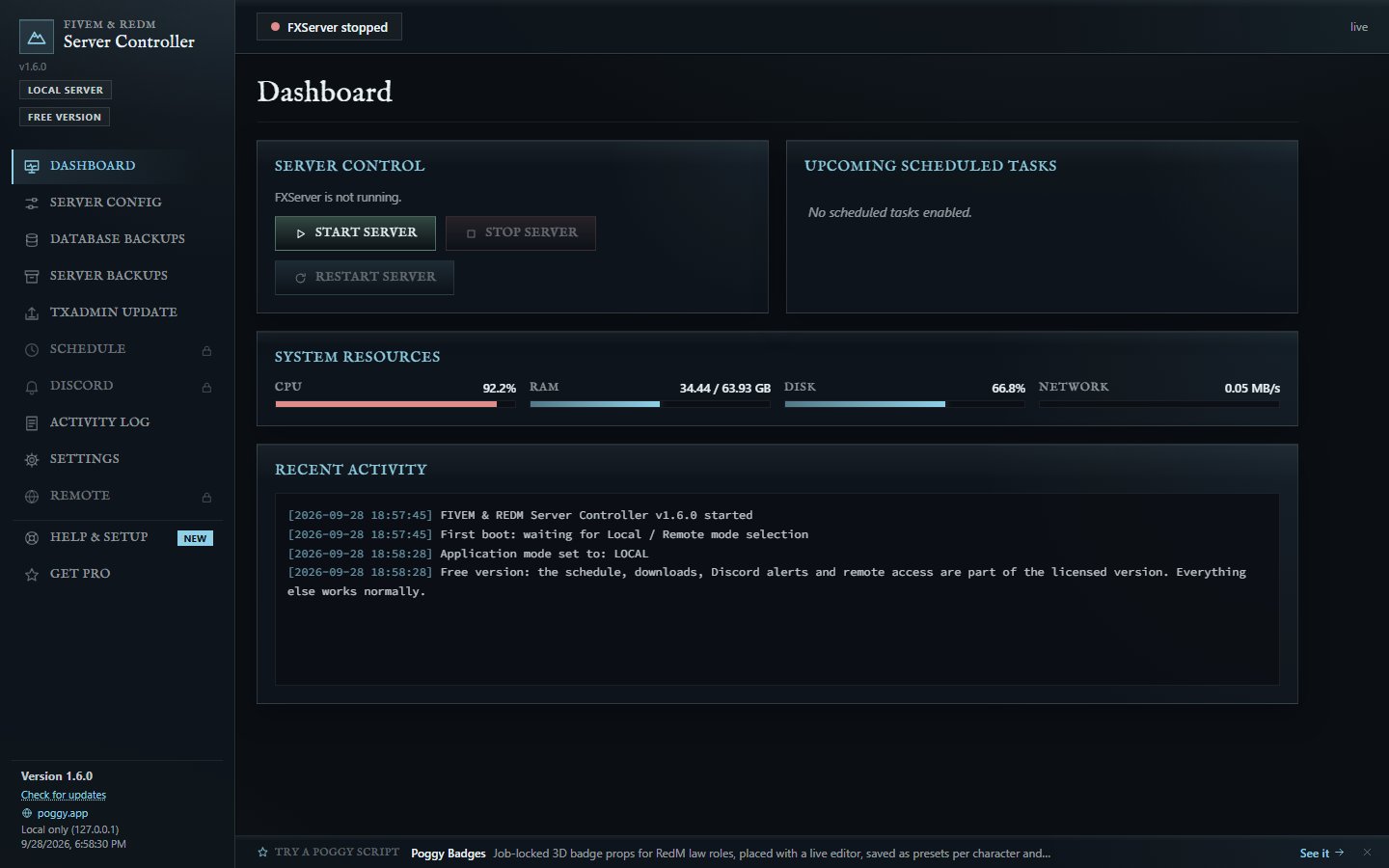
 服务器控制 — 启动、停止和重启FXServer,并在仪表板上显示其实时状态。
 实时仪表板 — CPU、内存、磁盘和网络计量器,实时活动日志,以及每个长时间任务的实时进度条。
 数据库备份 — 一键执行mysqldump备份,并支持一键恢复。
 服务器文件备份 — 压缩您的资源文件夹,您可以排除特定文件夹以跳过大型文件。
 恢复 — 从列表中回滚任何数据库、服务器文件或txAdmin备份。
 txAdmin更新 — 检查FiveM的官方工件,备份当前服务器,下载推荐版本,解压并重启FXServer。一键操作。
 数据库设置向导 — 扫描每个驱动器中的XAMPP、WAMP、Laragon、MySQL和MariaDB,直接从server.cfg中读取
mysql_connection_string,并测试连接。如果没有MySQL可用?关闭数据库备份,其他操作继续进行。
 帮助与设置 — 实时检查您的安装,每个警告都有一个直接跳转到修复方案的按钮,逐步指南,以及症状及其修复方案的列表。
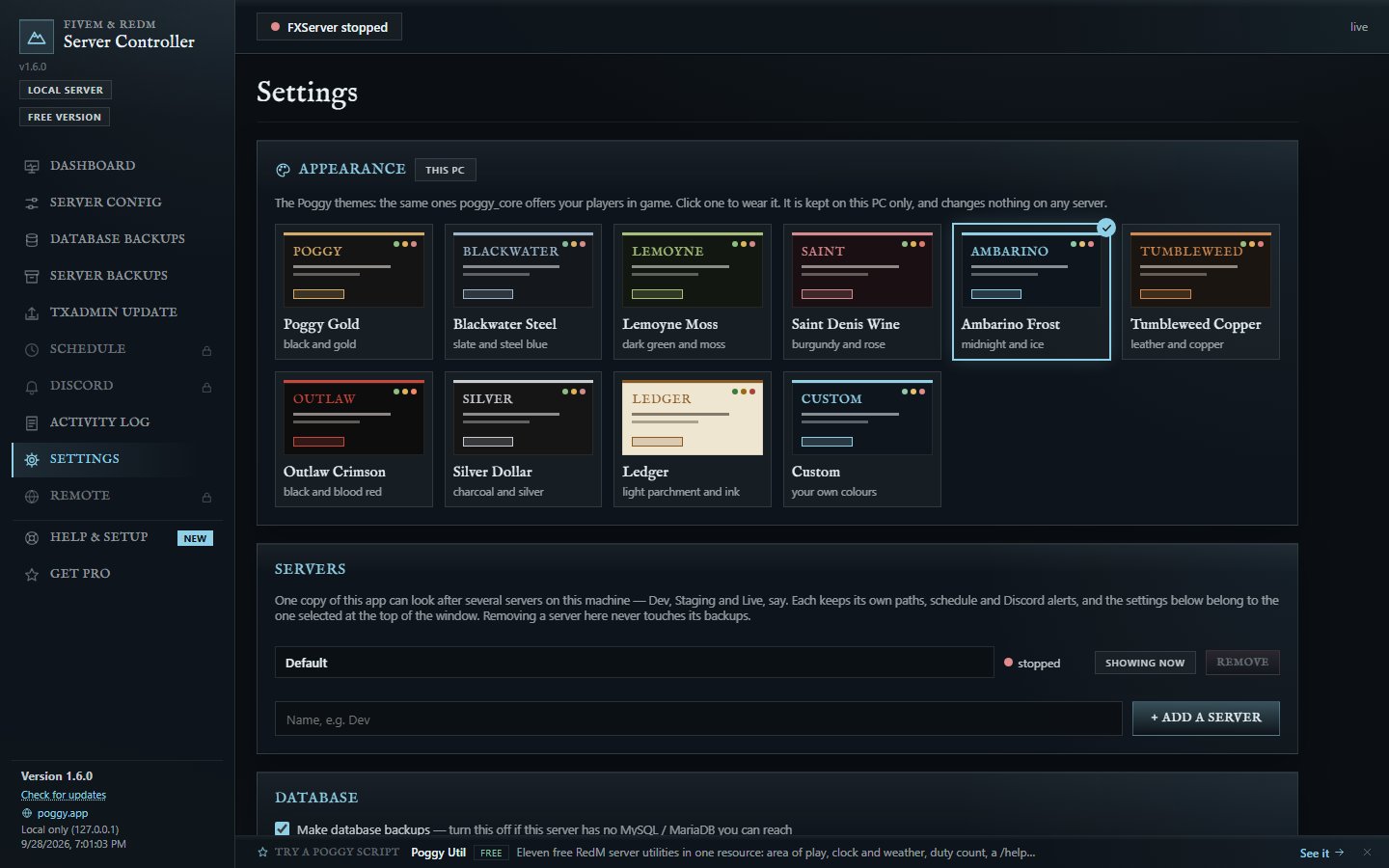
 Poggy外观 — 每个Poggy主题(Ambarino Frost、Poggy Gold、Blackwater Steel、Saint Denis Wine、浅色Ledger等)或您自己的颜色。与游戏中的主题相同。
 自动更新 — 每12小时检查一次新版本,询问一次,然后在顶部以金色线条等待您点击。
 专业版:在您睡觉时,无论身在何处
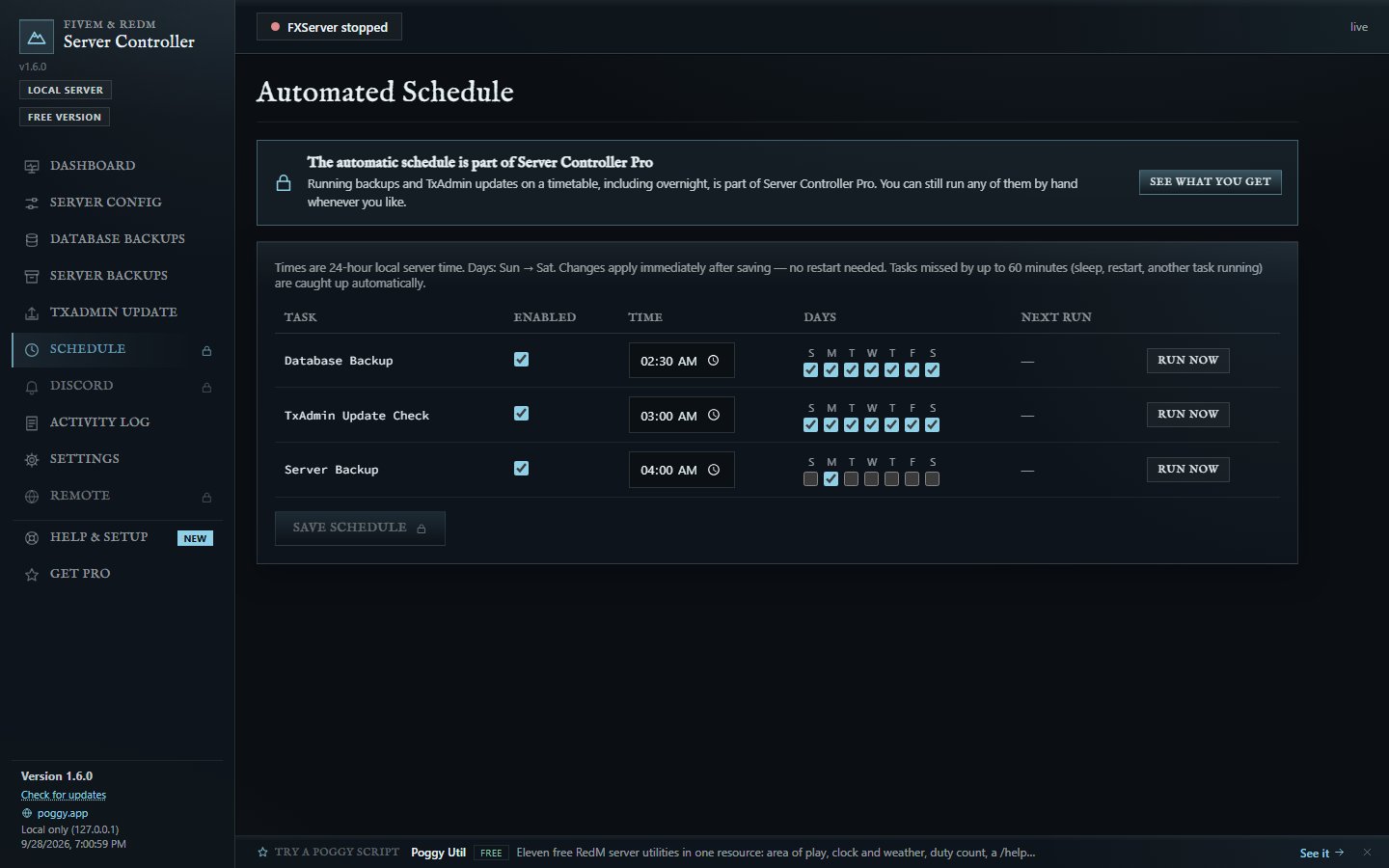
 自动计划 — 在您选择的时间和日期进行数据库备份、文件备份和txAdmin更新。如果因为电脑睡眠或重启而错过备份?它将在一小时内补上,并在日志中显示运行延迟。
 备份传输到本地 — 将任何备份复制到您所在的电脑上,显示速度和剩余时间,或自动收集每个新备份。仅存在于服务器上的备份将随服务器一同消失。
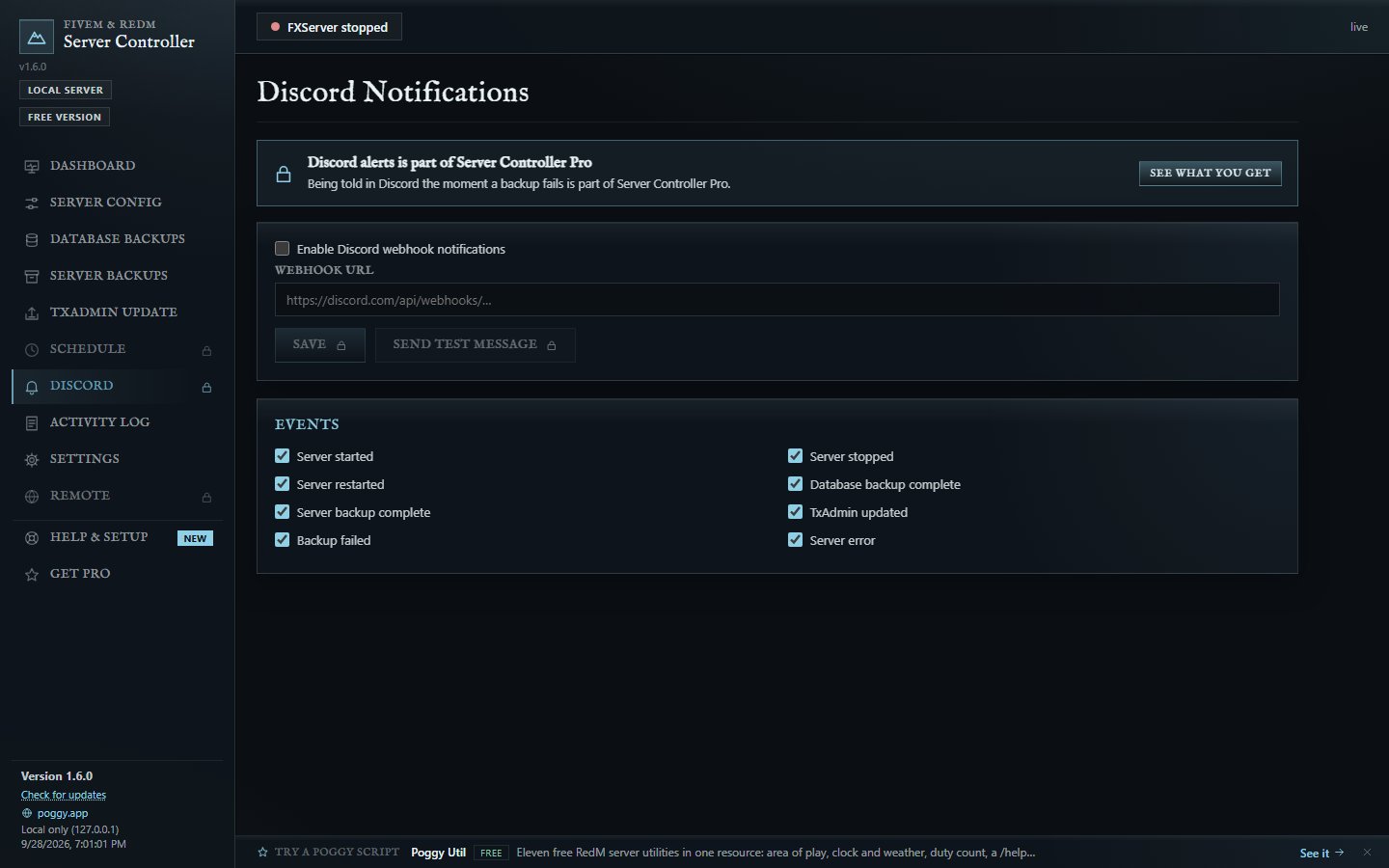
 Discord警报 — 服务器停止或启动时立即发布帖子,备份完成或出现故障时发布帖子。选择您感兴趣的事件。
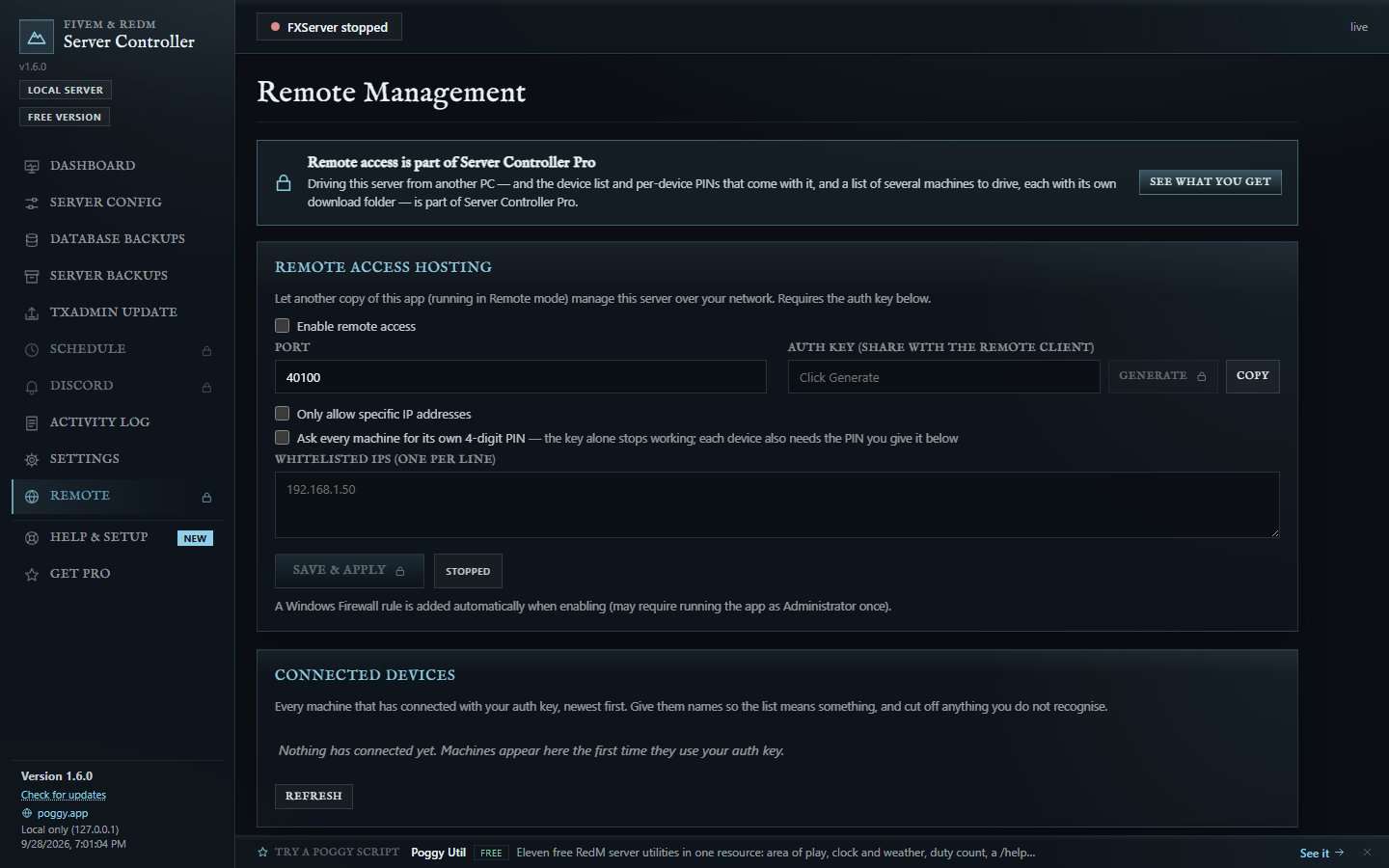
 从任何地方运行 — 在您的电脑上以远程模式运行Pro应用程序,并从那里控制服务器机器:每个选项卡都与服务器上的操作完全一致。
 知道谁已连接 — 每台连接的机器都按名称列出,带有实时点标和最后出现时间。断开一台机器,永久阻止它,或遗忘它。
 每台设备一个PIN码 — 开启后,仅凭授权密钥无法打开:每台机器都需要您的批准和独立的4位PIN码。发布新PIN码,将锁定一台机器。
 多个服务器,一个窗口 — 开发、测试和生产环境在一个窗口中,每个环境都有独立的路径、端口、计划、警报和备份文件夹,通过顶部栏切换,仪表板上一目了然。从客户端,可以控制多个服务器机器。
 屏幕截图
 下载
免费下载,专业版: FiveM & RedM服务器备份工具 — 服务器控制器 | Poggy Scripts
专业版价格为$2.99/月或$14.99/次,或包含在All Access中,每个付费Poggy脚本的价格为$14.99/月。
需要帮助?
获取支持: Poggy Scripts
 60秒内完成设置
- 在服务器机器上运行
ServerController.exe(或ServerControllerPro.exe),并选择本地服务器。 - 在设置中填写您的路径:备份文件夹、txAdmin文件夹、7-Zip。数据库设置向导将自动查找并测试您的MySQL详细信息。
- 从仪表板进行备份、恢复、更新或重启。使用专业版时,设置计划并安心睡觉。
激活专业版: 使用Discord登录,或在您不愿登录的共享服务器上,从手机输入应用程序代码到poggy.app/activate,或通过Discord私信获取PIN码。这两种方式都不会使服务器机器登录任何内容。
 依赖项
- Windows(Windows Server完全支持;如果缺失,WebView2将自动安装)
- MySQL / MariaDB客户端工具(mysqldump / mysql)用于数据库备份
- 7-Zip用于txAdmin更新
- 一个带有txAdmin的FiveM或RedM服务器
我的其他脚本
All Access — 所有付费脚本和服务器控制器专业版,在一个订阅中 — $14.99/mo
每个Poggy脚本通过免费poggy_core在VORP、RSG和QBCore RedM上运行。
- Poggy Markets — 玩家商店、实时价格和商品交易所
- Auction House
- Poggy Fishing
- Witnesses
- Poggy Chess — 国际象棋和跳棋桌、赌注和Elo评分
- Poggy AnimTool
- Poggy Badges
- Poggy’s Supply Drops
- Poggy Emotes
- Poggy Transform
- Poggy Scenes
- Poggy’s Balloon Taxi
- Poggy Trash Bins
免费: Poggy Core · Poggy Tickets · Poggy Crafting · Poggy Multijob · Poggy Util · Poggy Storage · Poggy Skillcheck · Admin Blips
浏览所有内容:poggy.app/store
 隐私与网络透明度
服务器控制器没有任何分析、跟踪或遥测功能。 它不会报告使用情况、收集统计数据或上传任何关于您或您服务器的信息。您的服务器文件、数据库内容、备份和密码始终保存在您自己的机器上。
它仅在以下情况访问互联网,且仅在使用时:
| 连接 | 访问目标 | 触发时机 |
|---|---|---|
| txAdmin 更新 | FiveM 官方 artifacts 服务器 (runtime.fivem.net) |
在执行更新检查或安装时 |
| 其自身的更新 | GitHub (api.github.com),应用的公开发布页面 |
每 12 小时,以及当你点击更新时 |
| 脚本建议(仅限免费版) | poggy.app/llms.txt |
每天最多一次;Pro 版从不获取 |
| Pro 许可证 | poggy.app(以及 Discord,如果你用它登录的话) |
在你激活时、Pro 启动时,以及每 12 小时 |
| Discord 提醒(Pro 版) | 你粘贴的 Discord webhook you | 当你勾选的事件发生时 |
| 远程模式(Pro 版) | 仅限你自己的服务器设备,并使用你的授权密钥 | 当有客户端连接时 |
| WebView2 安装 | Microsoft (go.microsoft.com) |
仅在 Windows 缺少该组件时,于首次启动时 |
| 支持与帮助链接 | 你的网页浏览器 | 仅在你点击其中一个时 |
无法连接到许可证服务器绝不会锁定 Pro 版本:只有明确返回“否”才会。
 关于 Windows 警告
该 exe 尚未进行代码签名,因此 Windows SmartScreen 会显示针对未签名程序的标准警告。请选择 更多信息 → 仍要运行。
对此有任何疑问?请在 Discord 中提问——很乐意为您解答。
| 代码可访问 | 否(已编译的应用程序) |
| 基于订阅 | 可选:免费版无许可证;Pro 版每月 2.99 美元或一次性 14.99 美元,或包含在 All Access 中 |
| 代码行数(约) | ~17,000 |
| 依赖项 | Windows、MySQL 客户端工具(用于数据库备份)、7-Zip(用于 txAdmin 更新) |
| 支持 | 是 |
查看英文原文 (Original)
Server Controller — Your FiveM / RedM Server, Backed Up and Up to Date
Server Controller is a standalone Windows desktop app for running a FiveM or RedM server: one executable, nothing to install. From one window it starts, stops and restarts FXServer, backs up the database and the server files, restores any backup and keeps txAdmin up to date.
No resource. No server.cfg edits. It runs next to your server, not inside it, so it works with every framework (ESX, QBCore, QBox, VORP, RSG, standalone… all of them).
Current version: 1.6.0. It comes in two editions:
- Free — everything you do by hand. No account, no sign-in, no licence: download it, open it, and it works.
- Pro — everything that happens without you: overnight backups and updates, backups copied home, Discord alerts, remote control, and several servers in one window.
Your settings live in %APPDATA%\ServerController\, so moving from Free to Pro (or to a newer version) keeps your whole setup.
Free: run it by hand
Server Control — start, stop and restart FXServer, with its live status on the dashboard.
Live Dashboard — CPU, RAM, disk and network meters, the activity log as it happens, and a real progress bar for every long job.
Database Backups — mysqldump backups at the press of a button, with one-click restore.
Server File Backups — zips your resources folder, with folders you can leave out so you skip the heavy stuff.
Restore — roll back any database, server file or txAdmin backup from its row.
txAdmin Updates — checks FiveM’s official artifacts, backs up your current server, downloads the recommended build, extracts it and restarts FXServer. One click.
Database Setup Wizard — scans every drive for XAMPP, WAMP, Laragon, MySQL and MariaDB, reads the mysql_connection_string straight out of your server.cfg, and tests the connection for real. No MySQL within reach? Switch database backups off and the rest carries on.
Help & Setup — a live check of your install where every warning has a button that goes straight to the fix, step-by-step guides, and a list of symptoms with their fixes.
The Poggy Look — every Poggy theme (Ambarino Frost, Poggy Gold, Blackwater Steel, Saint Denis Wine, the light Ledger and more) or your own colours. The same themes as in game.
Updates Itself — checks for a new version every 12 hours, asks once, then waits in a gold line at the top until you click it.
Pro: while you sleep, and from anywhere
Automatic Schedule — database backups, file backups and txAdmin updates at the times and days you pick. Missed one because the PC was asleep or restarting? It catches up within the hour, and the log says it ran late.
Backups Come Home — copy any backup onto the PC you are sitting at, with speed and time remaining, or have every new one collected automatically. A backup that only lives on the server dies with the server.
Discord Alerts — a post the moment the server stops or starts, a backup finishes or something fails. Pick the events.
Run It From Anywhere — run the Pro app on your own PC in Remote mode and drive the server machine from there: every tab works exactly as it does on the server.
Know Who Is Connected — every machine that connects is listed by name with a live dot and when it was last seen. Disconnect one, block it for good, or forget it.
A PIN Per Device — switch it on and the auth key alone opens nothing: each machine needs your approval and its own 4-digit PIN. Issue a new PIN and exactly one machine is locked out.
Several Servers, One Window — Dev, Staging and Live on one box, each with its own paths, ports, schedule, alerts and backup folders, switched from the top bar, all at a glance on the dashboard. From a client, drive more than one server machine.
Screenshots
Download
Free download, and Pro: FiveM & RedM Server Backup Tool — Server Controller | Poggy Scripts
Pro is $2.99 a month or $14.99 once, or included in All Access with every paid Poggy script for $14.99 a month.
Need Help?
Get Support: Poggy Scripts
Setup in 60 seconds
- Run
ServerController.exe(orServerControllerPro.exe) on your server machine and pick Local Server. - Fill in your paths in Settings: backup folders, txAdmin folder, 7-Zip. The Database Setup wizard finds and tests your MySQL details for you.
- Back up, restore, update or restart from the dashboard. With Pro, set the schedule and go to bed.
Activating Pro: sign in with Discord, or, on a shared server box where you would rather not sign in, type the app’s code at poggy.app/activate from your phone, or get a PIN by Discord DM. Neither of those signs the server machine into anything.
Requirements
- Windows (Windows Server fully supported; WebView2 installs itself if missing)
- MySQL / MariaDB client tools (mysqldump / mysql) for database backups
- 7-Zip for txAdmin updates
- A FiveM or RedM server with txAdmin
MY OTHER SCRIPTS
ALL ACCESS — every paid script, and Server Controller Pro, on one subscription — $14.99/mo
Every Poggy script runs on VORP, RSG and QBCore RedM through the free poggy_core.
- Poggy Markets — player shops, living prices and a commodities exchange
- Auction House
- Poggy Fishing
- Witnesses
- Poggy Chess — chess and checkers tables, wagers and Elo ratings
- Poggy AnimTool
- Poggy Badges
- Poggy’s Supply Drops
- Poggy Emotes
- Poggy Transform
- Poggy Scenes
- Poggy’s Balloon Taxi
- Poggy Trash Bins
Free: Poggy Core · Poggy Tickets · Poggy Crafting · Poggy Multijob · Poggy Util · Poggy Storage · Poggy Skillcheck · Admin Blips
Browse everything at poggy.app/store
Privacy & Network Transparency
Server Controller has no analytics, tracking or telemetry. It doesn’t report usage, collect statistics or upload anything about you or your server. Your server files, database contents, backups and passwords stay on your own machines.
It only reaches the internet for these, and only when they’re in use:
| Connection | Goes to | When |
|---|---|---|
| txAdmin updates | FiveM’s official artifacts server (runtime.fivem.net) |
When an update check or install runs |
| Its own updates | GitHub (api.github.com), the app’s public release page |
Every 12 hours, and when you click Update |
| Script suggestions (Free only) | poggy.app/llms.txt |
At most once a day; Pro never fetches it |
| Pro licence | poggy.app (and Discord, if you sign in with it) |
When you activate, when Pro starts, and every 12 hours |
| Discord alerts (Pro) | The Discord webhook you paste in | When an event you ticked happens |
| Remote mode (Pro) | Only your own server machine, with your auth key | While a client is connected |
| WebView2 install | Microsoft (go.microsoft.com) |
Only if Windows is missing it, on first launch |
| Support & help links | Your web browser | Only when you click one |
A licence server that cannot be reached never locks a Pro copy: only a definite “no” does.
About Windows warnings
The exe isn’t code-signed yet, so Windows SmartScreen shows its standard warning for unsigned programs. Choose More info → Run anyway.
Questions about any of this? Ask in the Discord — happy to explain.
| Code is accessible | No (compiled application) |
| Subscription-based | Optional: Free has no licence; Pro is $2.99 a month or $14.99 once, or part of All Access |
| Lines (approximately) | ~17,000 |
| Requirements | Windows, MySQL client tools (for DB backups), 7-Zip (for txAdmin updates) |
| Support | Yes |
本文资源搬运自 CFX.re FiveM 官方论坛,原作者:PoggyScripts。原帖地址:https://forum.cfx.re/t/server-controller-backups-restores-txadmin-updates-for-fivem-redm-standalone-app/5425793











暂无评论内容